
External API Integrations
External API Integrations: Google Maps & OpenAIP
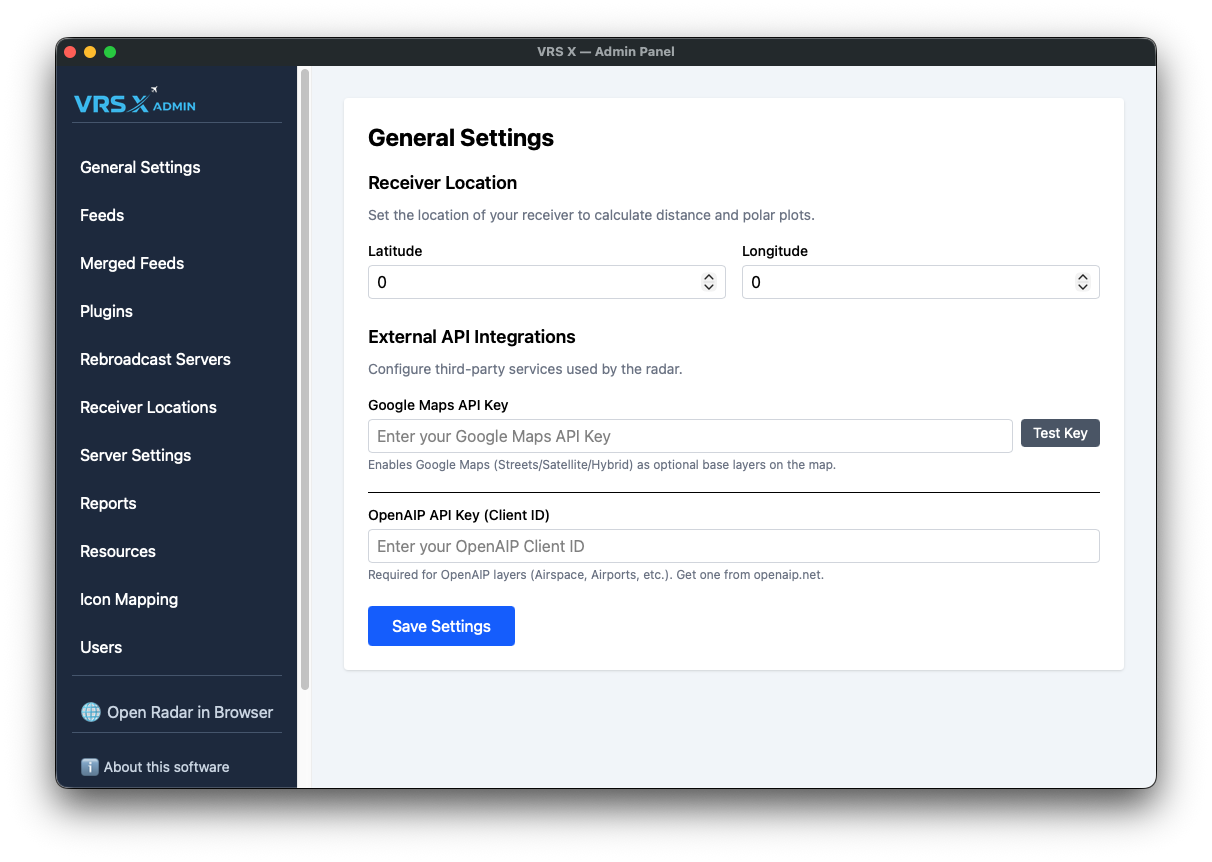
To enhance your radar experience with professional-grade base layers and aeronautical data, VRS X supports integration with third-party providers. These configurations are located in the General Settings panel.
1. Google Maps Integration
Adding a Google Maps API key unlocks premium base layers, including Streets, Satellite, and Hybrid views.
- Setup: Enter your unique key into the Google Maps API Key field.
- Verification: Click the Test Key button to instantly verify if your API key is valid and active.
- Result: Upon a successful test and save, the radar map will display additional Google Maps base layer options.
2. OpenAIP Integration
OpenAIP provides critical aeronautical layers, such as global airspaces and specialized airport data.
- Setup: Enter your Client ID (obtained from openaip.net) into the OpenAIP API Key (Client ID) field.
- Validation: Note that unlike Google Maps, there is no manual "Test" button for OpenAIP; the key is validated when the map engine requests data layers.
- Result: Once configured, OpenAIP layers like Airspace and specialized Airports will be available for rendering.
💾 Saving Your Configuration
To apply any changes made to External API Integrations:
- Ensure your keys are correctly pasted.
- Scroll to the bottom of the General Settings page.
- Click the Save Settings button to persist your changes to the server.
No comments to display
No comments to display