
Additional data: Aircraft Database
Data Sources: Aircraft Database
VRS X does not come with a built-in aircraft database. Why? Because I believe your database is the best, and I know how much time you've spent perfecting it.
By using the BYOD (Bring Your Own Data) approach, VRS X acts as a high-performance compatibility layer. You bring the data, and VRS X makes it fly. This also ensures we stay 100% compliant with various data provider licenses.
Supported Formats
How to Import Data
Importing hundreds of thousands of records is optimized to take only a few seconds, depending on your CPU power.
-
Go to the Admin Panel.
-
Select Server Settings from the menu.
-
Scroll down to the BaseStation Database section.
-
Paste the download URL for your chosen data source.
-
Click the corresponding "Import from..." button.
-
Scroll to the bottom and click Save Configuration.
-
Restart VRS X to apply changes.
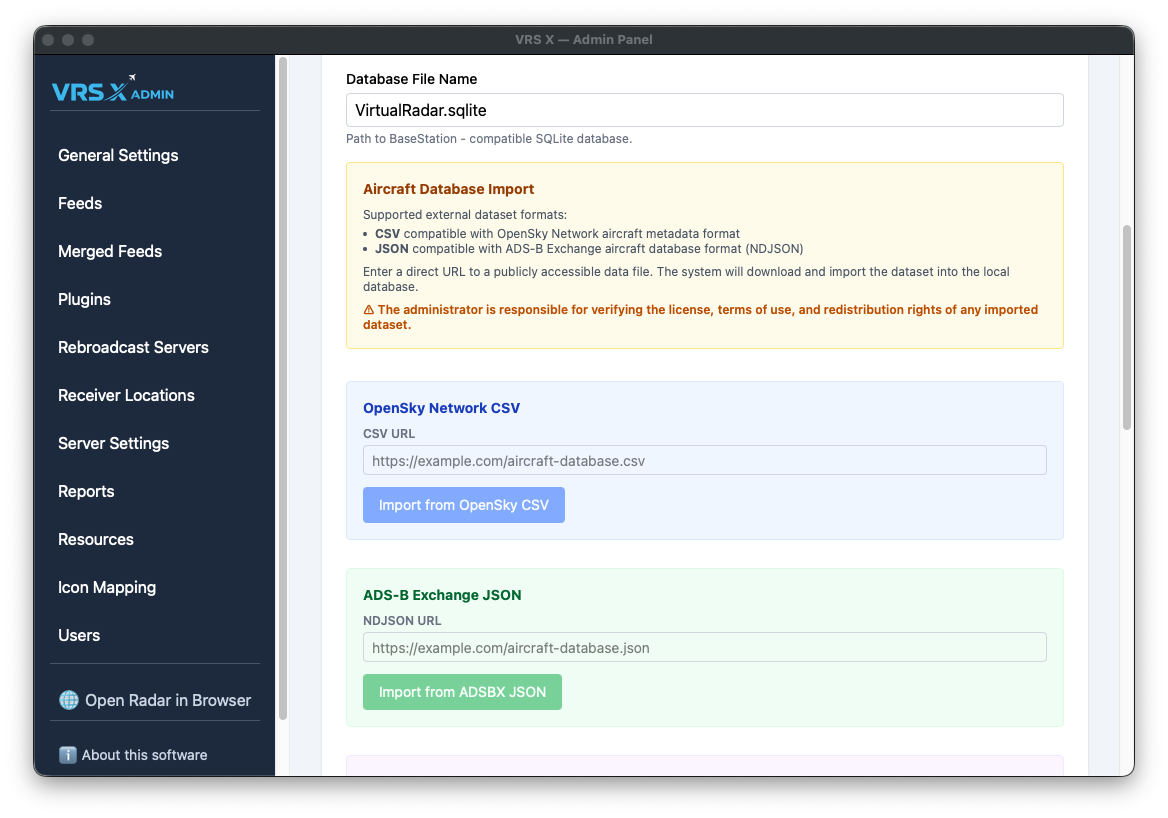
🛠️ Developer's Note (Visual Bug): > Currently, you might see OpenAIP settings in this section. This is a known visual bug and will be moved to its proper place in the next update.
🚀 Future Roadmap: > In upcoming versions, this entire section will move to a dedicated Resources tab, featuring a built-in Database Editor for direct manipulation of your records.
No comments to display
No comments to display