
Additional data: Airport Database.
Data Sources: Airport Database (OurAirports)
To display airports, runways, and metadata on the map, VRS X utilizes the community-driven OurAirports dataset. This allows you to have up-to-date global airport information without bloating the core application.
The Workflow
Just like the Aircraft Database, this follows the BYOD principle. You provide the source, and VRS X handles the heavy lifting of parsing and rendering.
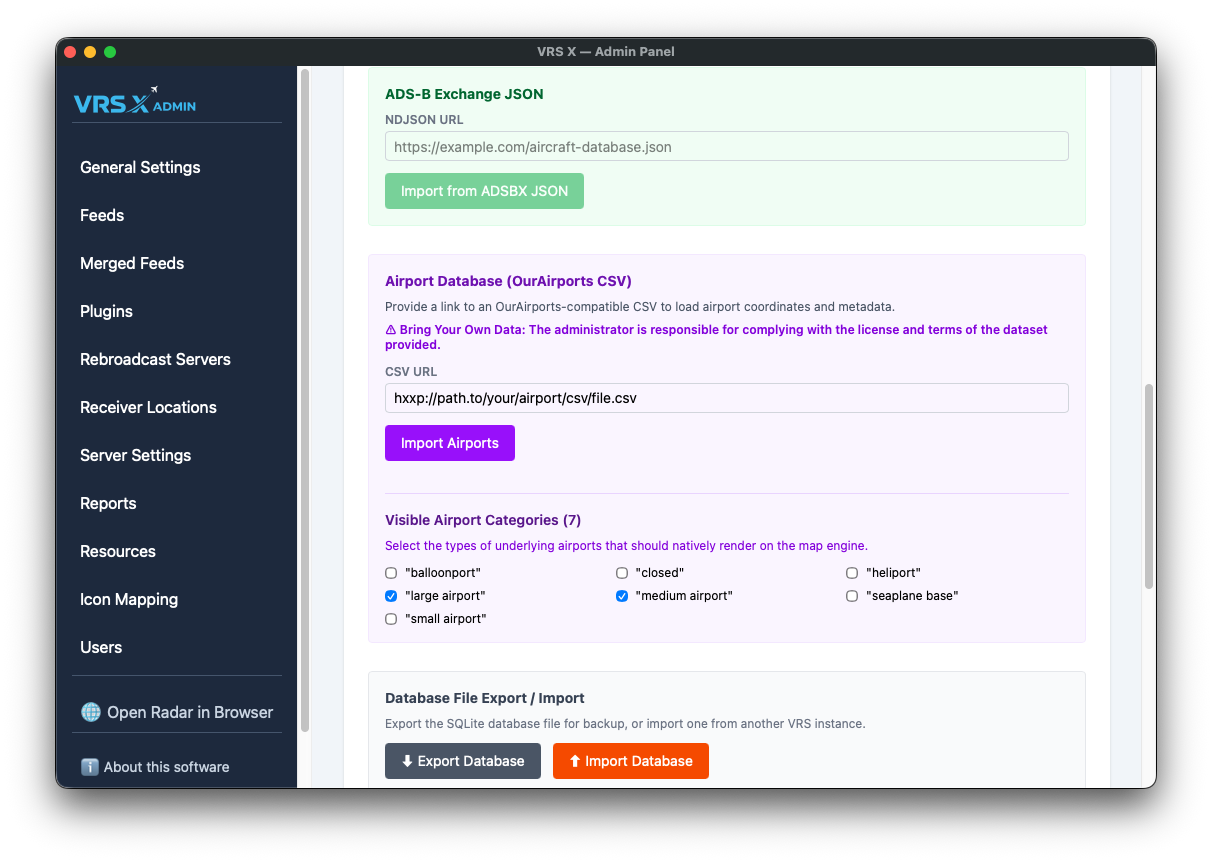
Visible Airport Categories
Not every "airport" is a massive international hub. To keep your map clean and high-performance, you can toggle which categories are natively rendered on the map engine.
Available categories include:
-
Large, Medium, and Small airports
-
Heliports and Seaplane bases
-
Balloonports
-
Closed facilities
💡 Pro-Tip: If your map feels cluttered, try unchecking "small airport" or "closed" to focus only on major hubs.
⚠️ License & Responsibility
Bring Your Own Data: The administrator is responsible for complying with the license and terms of the dataset provided. Ensure you respect the attribution requirements of OurAirports or any other source you decide to use.
No comments to display
No comments to display