
VRS X METAR Decoder
Weather Integration: The METAR Decoder
VRS X features a high-precision, state-of-art METAR decoder. It doesn't just display raw weather strings; it parses real-time data from NOAA (National Oceanic and Atmospheric Administration) to provide structured, actionable weather information directly on your radar.
Why it's different?
Most radar systems just "show" the METAR. VRS X understands it. The internal engine decodes wind vectors, pressure settings, cloud layers, and visibility to provide a clear overview of flight conditions (VFR/IFR/LIFR) at a glance.
This feature is enabled by default to ensure you always have the most accurate environmental data available.
Configuration
To make it working, please make sure Airport Database is created. To do, please refer to the article below:
Additional data: Airport Database.
On-Map Visualization
Once airports are imported, weather data is seamlessly integrated into the map experience
Decoded Data Includes:
-
Wind: Direction and speed (including gusts).
-
Visibility: Reported in statute miles or meters.
-
Sky Condition: Cloud layers (Few, Scattered, Broken, Overcast) and altitudes.
-
Temperature & Dew Point: Precise Celsius readings.
-
Altimeter (QNH): Critical pressure data for altitude calibration.
State-of-art decoding: The "Raw" vs "Decoded"
VRS X always keeps the raw METAR string for reference at the bottom of the weather card, but the UI highlights the parsed values. This ensures that even the most complex strings (including remarks/RMK) are handled with engineering-grade accuracy.
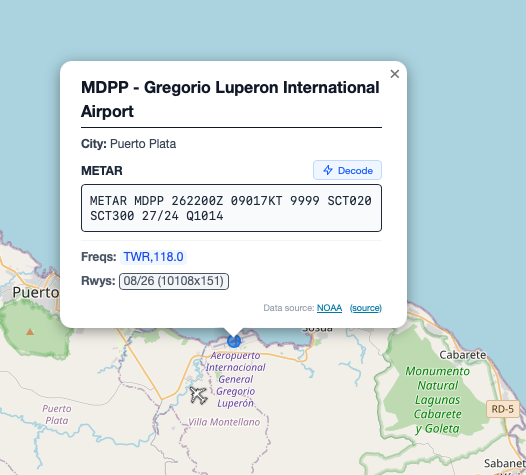
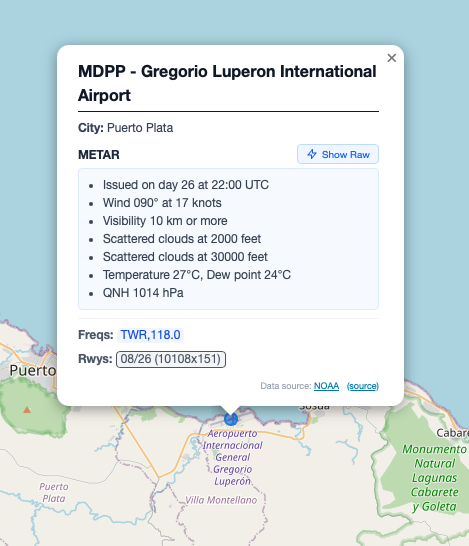
💡 Developer's Tip: The weather engine relies on the Airport Database (OurAirports). Ensure you have imported airports first, as VRS X uses ICAO codes to match weather reports to their geographical locations.
No comments to display
No comments to display