VRS X Security: Radar Privacy & User management
User Management & Access Control
This section handles the security of your VRS X instance, allowing you to control who can view your radar data and who can modify server configurations.
Radar Visibility
The Web Server settings defines the global reach of your radar map. You can find it under Server Settings option:
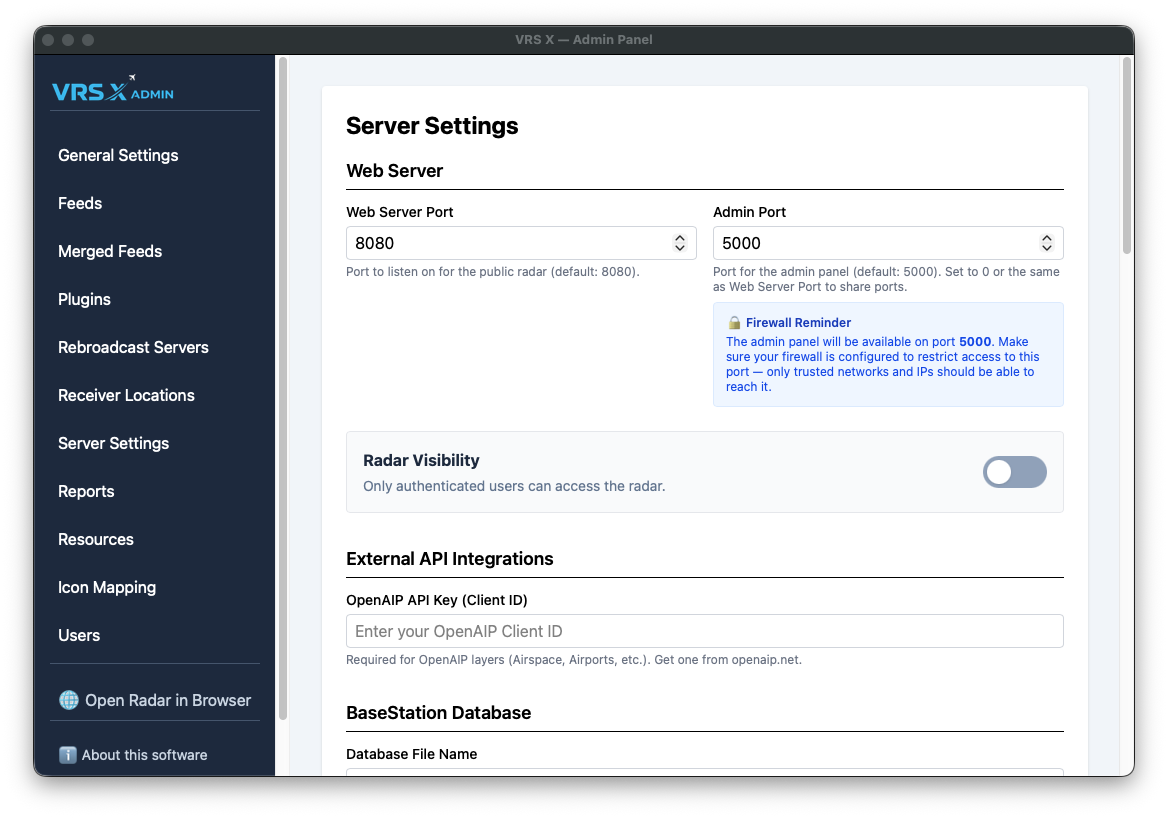
- Web server port: Port number on which radar will be accessible
- Admin port: WiP: Port number for Admin Panel - Admin port can be the same as Web Server Port, but mind the security
-
RADAR VISIBILTY: defines if radar is private or public. If Radar Visibility is OFF, user login is required. If its ON, everyone can see the radar.
User Management (IAM)
VRS X includes a basic Identity and Access Management (IAM) system. This allows an administrator to create dedicated accounts for other users or additional admins.
You can find this panel under Users in the sidebar.
Roles and Privileges
Administrator Actions
Administrators have the power to manage the user lifecycle at any time:
-
Toggle Role: Instantly change a user's privileges between "User" and "Admin".
-
Reset PW: Reset a user's password if they lose access.
-
Delete: Permanently revoke access by deleting the account.
Creating New Users
Only an existing Admin can create new accounts.
-
Enter a Username (minimum 3 characters).
-
Assign a Temporary Password (minimum 6 characters).
-
Select the Role and click Create User.
💡 First Login Policy: To ensure account security, any new user must change their password upon their first login. If a user has not yet completed this step, their status will be displayed as "Must change password" in the management table.